Showing posts with label CLR. Show all posts

Tuesday, September 21, 2010

FirstWeekOfYear without getLocaleInfo

Sometimes it happens, that the function WinAPI::getLocaleInfo() raises an exception, when calling the Windows function GetLocaleInfoW in Kernel32.

While the function works for the GUI client, you get this exception in Enterpriseportal:
Dynamics Object Adapter Call failed.

Funktion 'GetLocaleInfoW' in DLL-Bibliothek 'KERNEL32' hat eine Ausnahmebedingung ausgelöst.

Microsoft.Dynamics.BusinessConnectorNet.XppException
at Microsoft.Dynamics.BusinessConnectorNet.AxaptaObject.Call(String methodName, Object[] paramList)
at Microsoft.Dynamics.Framework.BusinessConnector.Session.DynamicsObjectAdapter.Call(String methodName, Object param1)

The impact for the user was, that he just get a plain lookup popup window instead a calendar popup to select a date for a data field. *

I was unable to find the excact reason for that bug. But I assume it's the combination of x64 architecture, the .NET Business Connector and the use of a Unicode Windows Kernel function.

To bypass the error we've modified the method Global::firstWeekOfYear(), which was the caller to WinAPI::getLocaleInfo(), as follow:

Original:
static int firstWeekOfYear()
{
    #WinAPI
    return str2int(WinAPI::getLocaleInfo(#LOCALE_USER_DEFAULT, #LOCALE_FIRSTWEEKOFYEAR));
}
Modified:
static int firstWeekOfYear()
{
    /* #WinAPI
    return str2int(WinAPI::getLocaleInfo(#LOCALE_USER_DEFAULT, #LOCALE_FIRSTWEEKOFYEAR));
    */

    System.Globalization.DateTimeFormatInfo info = System.Globalization.DateTimeFormatInfo::get_CurrentInfo();
    System.Globalization.CalendarWeekRule rule = info.get_CalendarWeekRule();
    ;
    return(CLRInterop::getAnyTypeForObject(rule));
}

With this modification the Windows function GetLocaleInfoW in Kernel32 will not be direct used.

* Webframework based on Webforms (until AX 2009)

FirstWeekOfYear ohne getLocaleInfo

Manchmal kommt es vor, dass die Funktion WinAPI::getLocaleInfo() beim Aufruf der Windowsfunktion GetLocaleInfoW in Kernel32 einen Fehler verursacht.

Während die Funktion über den GUI-Client einwandfrei funktioniert, erhält man beim Aufruf über das Enterpriseportal eine Ausnahme:

Dynamics Object Adapter Call failed.

Funktion 'GetLocaleInfoW' in DLL-Bibliothek 'KERNEL32' hat eine Ausnahmebedingung ausgelöst.

Microsoft.Dynamics.BusinessConnectorNet.XppException
at Microsoft.Dynamics.BusinessConnectorNet.AxaptaObject.Call(String methodName, Object[] paramList)
at Microsoft.Dynamics.Framework.BusinessConnector.Session.DynamicsObjectAdapter.Call(String methodName, Object param1)

Für den Benutzer bedeutete dies, dass er in Lookupfenstern zum Auswählen eines Datums schlichtweg einfach nur eine weisse Seite sah, statt des erwarteten Kalenders.*

Leider konnten wir die Ursache des Fehlers nicht herausfinden. Ich vermute allerdings, dass die Kombination von x64-Architektur, dem .NET-Business-Connector und dem Aufruf einer Unicode-Windows-Kernelfunktion etwas damit zu tun hat.

Als Abhilfe haben wir die betreffende Methode Global::firstWeekOfYear(), welche in unserem Fall die Aufrufende Methode war, wie folgt angepasst:

Original:
static int firstWeekOfYear()
{
    #WinAPI
    return str2int(WinAPI::getLocaleInfo(#LOCALE_USER_DEFAULT, #LOCALE_FIRSTWEEKOFYEAR));
}
Modifiziert:
static int firstWeekOfYear()
{
    /* #WinAPI
    return str2int(WinAPI::getLocaleInfo(#LOCALE_USER_DEFAULT, #LOCALE_FIRSTWEEKOFYEAR));
    */

    System.Globalization.DateTimeFormatInfo info = System.Globalization.DateTimeFormatInfo::get_CurrentInfo();
    System.Globalization.CalendarWeekRule rule = info.get_CalendarWeekRule();
    ;
    return(CLRInterop::getAnyTypeForObject(rule));
}

Auf diese Weise wird die Windowsfunktion GetLocaleInfoW in Kernel32 erst gar nicht direkt verwendet.

* Webframework basierend auf Webforms (bis AX 2009)

Sunday, May 2, 2010

Decode CLR Exception message

The ability to use .NET code inside X++ source code is a neat feature. If the native code brings limitations, you may can solve it with .NET code. Unfortunately the .NET framework exception messages in AX are very superficially.

The following static method can be used to decode a .NET exception:

static void cRLExtendException(System.Exception _exception)
{
    System.Exception exception = _exception;
    SysInfoLogStr infoLogStr;
    ;
    if (exception)
    {
        infoLogStr = exception.get_Message();
        if (exception.Equals(exception.GetBaseException()))
        {
            // the most inner exception has reached, now we can write the infolog message and throw the exception
            error(infoLogStr);
            throw Exception::CLRError;
        }
        else
        {
            // the current exception is not the most inner exception, so we just set a infolog prefix
            setprefix(infoLogStr);
            MyClass::cRLExtendException(exception.get_InnerException());
        }

    }
    /* else
    {
        well, there was no CLR exception, so just left out
    }
    */
}

And that's how to use it:

System.String[] files;
;

try
{
    files = System.IO.Directory::GetFiles('c:\\halliGalli');
}
catch
{
    MyClass::cRLExtendException(CLRInterop::getLastException());
}
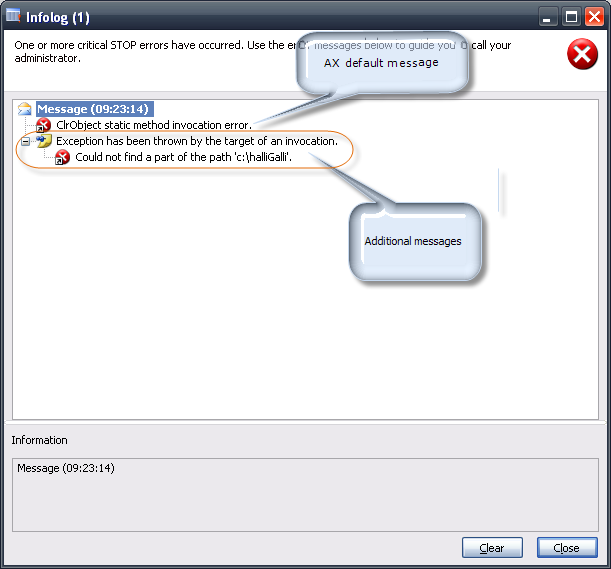
Now your infolog window will look like this:


In this case the auxiliary method is hosted on a class named 'MyClass'. Where the method should be implemented on your environment has to be decided by you or your team.

Monday, April 26, 2010

CLR Fehlermeldungen aufschlüsseln

Die Einbindung von .NET-Code im X++ Sourcecode ist eine hübsche Sache. Was sich mit Native-Code nicht bewerkstelligen lässt, kann unter Umständen mit .NET-Code gelöst werden. Leider sind die Ausnahmen deren Ursprung dem .NET-Framework zuzuschreiben sind meist sehr oberflächlich gehalten.
Folgende statischer Methode automatisiert das Aufschlüsseln der .NET-Ausnahme:

static void cRLExtendException(System.Exception _exception)
{
    System.Exception exception = _exception;
    SysInfoLogStr infoLogStr;
    ;
    if (exception)
    {
        infoLogStr = exception.get_Message();
        if (exception.Equals(exception.GetBaseException()))
        {
            // the most inner exception has reached, now we can write the infolog message and throw the exception
            error(infoLogStr);
            throw Exception::CLRError;
        }
        else
        {
            // the current exception is not the most inner exception, so we just set a infolog prefix
            setprefix(infoLogStr);
            MyClass::cRLExtendException(exception.get_InnerException());
        }

    }
    /* else
    {
        well, there was no CLR exception, so just left out
    }
    */
}

Und so wird die neue Hilfsmethode verwendet:

System.String[] files;
;

try
{
    files = System.IO.Directory::GetFiles('c:\\halliGalli');
}
catch
{
    MyClass::cRLExtendException(CLRInterop::getLastException());
}

So sieht dann die Ausgabe des Infolog-Fensters aus:


In den Codebeispielen wurde die Hilfsmethode auf einer Klasse mit dem Namen 'MyClass' angelegt. Auf welcher Klasse schulssendlich die Methode implementiert wird, sollte aber der Entwickler, beziehungsweise das Entwicklerteam entscheiden.