Monday, May 31, 2010

throw "mischief"

Exception handling in AX is actually very simple. You have a bundle predefined exception codes (info, warning, error, CLRError, and so on) and that it is. As much more I was astonished, when a coworker shows me the follow code, saying the exception would be thrown, but the error message was never displayed:

throw strfmt("Error in %1", funcname());


The right X++ code was then:

throw error(strfmt("Error in %1", funcname()));


While the typical argument for throw is an enumeration of type Exception (), actually the throw instruction accepts any in AX existing type.

After some tests I get the follow insights:


  • The Kernel obviously tries to convert the given argument into an integer and then to procced the conversion:


    F.ex. this X++ code

    throw "3";


    raises an exception with the type error. Ditto

    throw "3.7";
    

  • More complex types like objects and tables (except a not initialized CLR-Object) raises exception codes above value 255. Tough only exceptions between 0 and 255 can be handled in a different way, an exception above 255 can be catched with a general catch block.
  • try
    {
        throw 230;
    }
    catch (230)
    {
        info("This works fine.")
    }
    
    
    try
    {
        throw 256;
    }
    catch (256)
    {
        // this line will never reached
    }
    catch
    {
        info("That's the way it is!")
    }
    

Of course you may think this statement gives the ability to use self defined exception codes. I advice against this idea; in further versions of AX, the self defined codes could be used by the Kernel itself and brings unexpected side effects like continue database transactions (in fact, some exception codes include this feature already).

Friday, May 28, 2010

throw "dummfug"

Die Ausnahmebehandlung in AX ist ja im Prinzip sehr einfach gehalten. Es gibt eine vordefinierte Anzahl verschiedener Ausnahme-Codes (Info, Warning, Error, CLRError etc.) und damit hat es sich. Recht erstaunt war ich, als eine Arbeitskollegin mir folgenden Code zeigte, mit der Bemerkung dass wohl eine Ausnahme ausgelöst, aber die Feldermeldung dazu niemals angezeigt würde:

throw strfmt("Fehler in %1", funcname());


Der korrekte X++ Code lautete schliesslich:

throw error(strfmt("Fehler in %1", funcname()));


Während typischerweise ein Element der Enumeration vom Typ Exception (also im Prinzip eine Ganzzahl) an throw übergeben wird, akzeptiert diese Anweisung aber in Wirklichkeit jeden in AX vorhandenen Typ.

Nach ein paar Tests lässt sich folgende Aussagen machen:


  • Der Kernel versucht offensichtlich das Argument in eine Ganzzahl umzuwandeln und dann zu interpretieren:


    Der Code

    throw "3";


    löst beispielsweise eine Ausnahme vom Typ Error aus. Ebenso

    throw "3.7";
    

  • Komplexere Typen wie Objekte und Tabellen (mit Ausnahme von nicht initialisierten CLR-Objekten) lösen einen Ausnahmecode grösser 255 aus. Obwohl nur Ausnahmen zwischen 0 und 255 differenziert behandelt werden können, kann eine Ausnahme mit einem höheren Wert als 255 durch einen allgemeinen Catch-Block trotzdem abgefangen werden.
  • try
    {
        throw 230;
    }
    catch (230)
    {
        info("This works fine.")
    }
    
    
    try
    {
        throw 256;
    }
    catch (256)
    {
        // this line will never reached
    }
    catch
    {
        info("That's the way it is!")
    }
    

Nun könnte diese Feststellung natürlich dazu verleiten, selbst definierte Ausnahmecodes einzuführen und zu verwenden. Davon würde ich allerdings abraten; in kommenden Versionen könnten diese durch den Kernel definiert werden und spezielles Verhalten an den Tag legen, wie z.B. das weiterführen von Datenbranktransaktionen, was zur Zeit bei einigen Ausnahmen ja bereits der Fall ist.

Wednesday, May 26, 2010

ForUpdate record after record insert

Every time, if you save a record into database using method insert() or doInsert(), you're record handle is selected forUpdate. That means, that you can do data manipulation with update() or doUpdate() without reread the current record.

But to do this you can run into trouble. If you have not a database transaction outside the insertation and manipulation, other users can modify your record as well. And as soon you want to do your update() or doUpdate() you get an exception:

Cannot edit a record in Table (Tablename).
An update conflict occurred due to another user process deleting the record or changing one or more fields in the record.

Therefore avoid such code:

Table table;
;
table.KeyField = 'a';
table.insert();

table.AdditionalField = 'halli galli';
table.update();

Do it that way instead:

Table table;
;
ttsbegin;
table.KeyField = 'a';
table.insert();

table.AdditionalField = 'halli galli';
table.update();
ttscommit;

Or even this way:

Table table;
;
table.KeyField = 'a';
table.insert();

// time consuming other code here

ttsbegin;
table.selectForUpdate(true);
table.reread();
table.AdditionalField = 'halli galli';
table.update();
ttscommit;

Depending on requirements you may need a database transaction over all code or not.

ForUpdate-Datensatz nach dem Einfügen eines Datensatzes

Jedes mal, wenn ein Datensatz mit der insert()- oder der doInsert()-Methode auf der Datenbank erzeugt wird, erhält man den neu erzeugten Datensatz mit dem Prädikat forupdate. Das heisst im Prinzip, dass ich den Datensatz beliebig mit update() oder doUpdate() ändern kann ohne ich vorher von der Datenbank neu lesen zu müssen.

Allerdings gibt es oft Probleme, wenn das ganze nicht in einer Datenbanktransaktion gehalten wird: U.u. wird der Datensatz nämlich in der Zwischenzeit verändert und das führt zu einer Ausnahme sobald update() oder doUpdate() die Änderung in die Datenbank schreiben soll:

Ein Datensatz in Debitoren (Tabellenname) kann nicht bearbeitet werden.
Aktualisierungskonflikt, weil ein anderer Benutzerprozess den Datensatz gelöscht oder mindestens ein Feld im Datensatz geändert hat.

Deshalb sollte man solchen Code vermeiden:

Table table;
;
table.KeyField = 'a';
table.insert();

table.AdditionalField = 'halli galli';
table.update();

Stattdessen sollte man ihn entweder so schreiben:

Table table;
;
ttsbegin;
table.KeyField = 'a';
table.insert();

table.AdditionalField = 'halli galli';
table.update();
ttscommit;

Oder so:

Table table;
;
table.KeyField = 'a';
table.insert();

// time consuming other code here

ttsbegin;
table.selectForUpdate(true);
table.reread();
table.AdditionalField = 'halli galli';
table.update();
ttscommit;

Je nach Anforderung ob der Datensatz in der Zwischenzeit verändert werden darf braucht es eine alles umfassende Datenbanktransaktion oder eben nicht.

Sunday, May 2, 2010

Decode CLR Exception message

The ability to use .NET code inside X++ source code is a neat feature. If the native code brings limitations, you may can solve it with .NET code. Unfortunately the .NET framework exception messages in AX are very superficially.

The following static method can be used to decode a .NET exception:

static void cRLExtendException(System.Exception _exception)
{
    System.Exception exception = _exception;
    SysInfoLogStr infoLogStr;
    ;
    if (exception)
    {
        infoLogStr = exception.get_Message();
        if (exception.Equals(exception.GetBaseException()))
        {
            // the most inner exception has reached, now we can write the infolog message and throw the exception
            error(infoLogStr);
            throw Exception::CLRError;
        }
        else
        {
            // the current exception is not the most inner exception, so we just set a infolog prefix
            setprefix(infoLogStr);
            MyClass::cRLExtendException(exception.get_InnerException());
        }

    }
    /* else
    {
        well, there was no CLR exception, so just left out
    }
    */
}

And that's how to use it:

System.String[] files;
;

try
{
    files = System.IO.Directory::GetFiles('c:\\halliGalli');
}
catch
{
    MyClass::cRLExtendException(CLRInterop::getLastException());
}
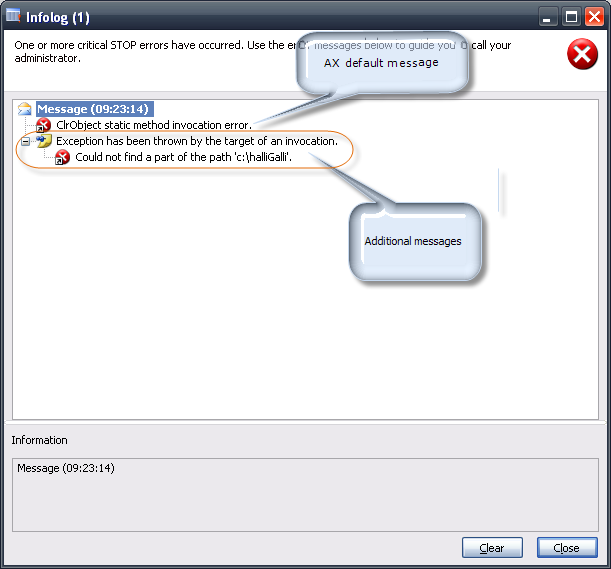
Now your infolog window will look like this:


In this case the auxiliary method is hosted on a class named 'MyClass'. Where the method should be implemented on your environment has to be decided by you or your team.

Monday, April 26, 2010

CLR Fehlermeldungen aufschlüsseln

Die Einbindung von .NET-Code im X++ Sourcecode ist eine hübsche Sache. Was sich mit Native-Code nicht bewerkstelligen lässt, kann unter Umständen mit .NET-Code gelöst werden. Leider sind die Ausnahmen deren Ursprung dem .NET-Framework zuzuschreiben sind meist sehr oberflächlich gehalten.
Folgende statischer Methode automatisiert das Aufschlüsseln der .NET-Ausnahme:

static void cRLExtendException(System.Exception _exception)
{
    System.Exception exception = _exception;
    SysInfoLogStr infoLogStr;
    ;
    if (exception)
    {
        infoLogStr = exception.get_Message();
        if (exception.Equals(exception.GetBaseException()))
        {
            // the most inner exception has reached, now we can write the infolog message and throw the exception
            error(infoLogStr);
            throw Exception::CLRError;
        }
        else
        {
            // the current exception is not the most inner exception, so we just set a infolog prefix
            setprefix(infoLogStr);
            MyClass::cRLExtendException(exception.get_InnerException());
        }

    }
    /* else
    {
        well, there was no CLR exception, so just left out
    }
    */
}

Und so wird die neue Hilfsmethode verwendet:

System.String[] files;
;

try
{
    files = System.IO.Directory::GetFiles('c:\\halliGalli');
}
catch
{
    MyClass::cRLExtendException(CLRInterop::getLastException());
}

So sieht dann die Ausgabe des Infolog-Fensters aus:


In den Codebeispielen wurde die Hilfsmethode auf einer Klasse mit dem Namen 'MyClass' angelegt. Auf welcher Klasse schulssendlich die Methode implementiert wird, sollte aber der Entwickler, beziehungsweise das Entwicklerteam entscheiden.

Monday, April 12, 2010

Communicate with the RunBase Dialog

Sometimes you need to communicate with the RunBase object's dialog. Here are some information what you have to know to make it run well.

The Caller
Say, your RunBase dialog calls a custom form which contains special selection settings for the RunBase object (which f.ex. cannot be integrated in the RunBase dialog due layout specifications). So you've placed a menu item button to your dialog. That way the user can call the custom form with the special selection settings:

DialogRunbase ret;
;
ret = super(dialog, forceOnClient);
ret.addMenuItemButton(MenuItemType::Display, 
    menuItemDisplayStr(MyRunBaseSelectionForm));

But once the custom form is open, how to geht a handle to the RunBase object? To grab the RunBase object you need to dig the callers:

FormRun         formRunCaller;
DialogRunBase   dialogRunBase;
MyRunBaseClass  caller;
;
formRunCaller = element.args().caller(); // returns the dialog's form

// returns a DialogRunBase object
dialogRunBase = formRunCaller.args().caller();


// finally returns the RunBase object
caller = dialogRunBase.runBaseBatch(); 

Once you have the handle to the RunBase object you can acceed all public parameter methods and even the RunBase's QueryRun object.

Notify the caller
If the user decide to close your custom form with confirmation, so you need to notify the RunBase object about the new data. The best way is to place this code in the method closeOK() on your custom form:

public void closeOk()
{
    QueryRun qr = caller.queryRun();
    ;
    qr.whatEverYouHaveToManipulate(...);
    caller.parmThisAndThat(...);
    super();
}

Update the dialog values
As the user shall see the setting changes, you need to update the dialog controls. That for you can use the method dialogUpdate():

public void closeOk()
{
    QueryRun qr = caller.queryRun();
    ;
    qr.whatEverYouHaveToManipulate(...);
    caller.parmThisAndThat(...);
    caller.dialogUpdate(); // updates at least query range fields
    super();
}

If you want a little tutorial, you can download this sample project, demonstrates just what I tried to explain. Import the XPO file and open the class MyRunBaseClass, then click on the button "Pick customer".
Keep in mind, it's only a tutorial, the code is neither BP nor fool proofed!

Hope this can improve your coding skills :)