Friday, October 22, 2010

Unable to delete User Group after upgrade from AX 3.0 to AX 2009

Sometimes you are not able to delete user groups which are migrated from AX 3.0. The effect is as follow: you try to delete and the row removes, but re-opening the form will show the user group again.

This happens if the configuration key for Reporting Services is enabled, but there is no Reporting Services Server refered and configured in AX.

With a little modification in AOT/Forms/SysUserGroupInfo/Data Sources/User Group Info/delete you can workaround the problem.

public void delete()
{
    userGroupId groupID;
    SysSRSTablePermissions permissionsTable;
    AifEndpointUser aifEndpointUser;
    SysSecurityFormTable    sysSecurityFormTable;
    ;

    groupID = userGroupInfo.Id;

    ttsbegin;

    delete_from aifEndpointUser
        where aifEndpointUser.UserId == groupID
        && aifEndpointUser.AxaptaUserType == AifAxaptaUserType::UserGroup;

    delete_from sysSecurityFormTable
        where sysSecurityFormTable.UserGroupId == groupID;

    super();

    if (isConfigurationkeyEnabled(configurationKeyName2Id('ReportingServices')))
    {
        //Now that the group is deleted, we can synchronize all the secure views that
        //include RLS criteria for this group. We need to keep the record for this
        //group in SRSTablePermissions for now because they are used to determine which
        //tables have permissions assigned to them for the specified group.
        //Once all views have been synchronized, then we can delete those records.

        if (SRSSecureViewManagerProxy::syncWithGroup(groupID) != 0)
        {
            // modificaton begin
            if ((select * from SRSServers).RecId)
            {
                ttsabort;
                return;
            }
            /*else
            {
                just fall trough, there is no need to abort, since there is no Reporting Services Servers located
            }*/
            // modification end
        }

        //Delete all records for the group from the SRSTablePermissions table.
        delete_from permissionsTable where permissionsTable.GroupId == groupID;
    }

    ttscommit;
}

Now your able to delete migrated user groups.

Monday, October 4, 2010

Icons for Dynamics AX files

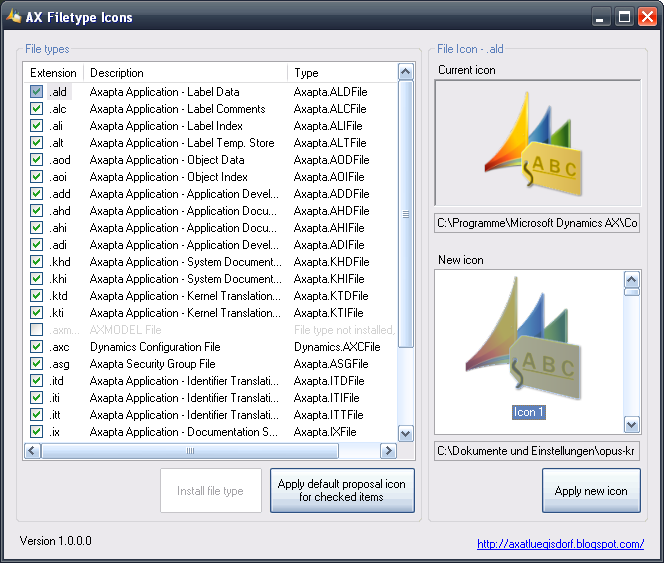
File used by Dynamics AX are often diplayed with the client executable icon or even with no related icon.

I've created some symbols which can be used as file icons for Dynamics AX. Additionally I've created a small application to let assign the files with the icons.


The application can be downloaded here:
http://www.luegisdorf.ch/AX/AXIcons.exe

On Vista/7 you have to run the application with administrator rights, otherwise the application will not work properly. And the executable file should be permanent placed in a local path, where it doesn't move again, because the icons are embedded in the EXE file (a good place could be C:\Programm files\Microsoft Dynamics AX\Common).

Icons für Dynamics AX Dateien

Die für Dynamics AX eingesetzten Dateien haben meistens das Standard-Icon des Clients oder gar kein Icon zugewiesen.

Ich habe ein paar Symbole gestaltet die sich als Datei-Icons für Dynamics AX verwenden lassen. Zusätzlich habe ich ein Programm erstellt, mit welchem die Icons zugewiesen werden können.


Das Programm findet man hier:
http://www.luegisdorf.ch/AX/AXIcons.exe

Man muss es allerdings unter Vista/7 als Administrator ausführen damit es richtig funktioniert. Und das Programm sollte permanent an einen lokalen Platz gelegt werden, an dem es nicht mehr wegverschoben wird, weil die Icons sich direkt in der EXE-Datei befinden (z.B: C:\Program files\Microsoft Dynamics AX\Common).

Tuesday, September 21, 2010

FirstWeekOfYear without getLocaleInfo

Sometimes it happens, that the function WinAPI::getLocaleInfo() raises an exception, when calling the Windows function GetLocaleInfoW in Kernel32.

While the function works for the GUI client, you get this exception in Enterpriseportal:
Dynamics Object Adapter Call failed.

Funktion 'GetLocaleInfoW' in DLL-Bibliothek 'KERNEL32' hat eine Ausnahmebedingung ausgelöst.

Microsoft.Dynamics.BusinessConnectorNet.XppException
at Microsoft.Dynamics.BusinessConnectorNet.AxaptaObject.Call(String methodName, Object[] paramList)
at Microsoft.Dynamics.Framework.BusinessConnector.Session.DynamicsObjectAdapter.Call(String methodName, Object param1)

The impact for the user was, that he just get a plain lookup popup window instead a calendar popup to select a date for a data field. *

I was unable to find the excact reason for that bug. But I assume it's the combination of x64 architecture, the .NET Business Connector and the use of a Unicode Windows Kernel function.

To bypass the error we've modified the method Global::firstWeekOfYear(), which was the caller to WinAPI::getLocaleInfo(), as follow:

Original:
static int firstWeekOfYear()
{
    #WinAPI
    return str2int(WinAPI::getLocaleInfo(#LOCALE_USER_DEFAULT, #LOCALE_FIRSTWEEKOFYEAR));
}
Modified:
static int firstWeekOfYear()
{
    /* #WinAPI
    return str2int(WinAPI::getLocaleInfo(#LOCALE_USER_DEFAULT, #LOCALE_FIRSTWEEKOFYEAR));
    */

    System.Globalization.DateTimeFormatInfo info = System.Globalization.DateTimeFormatInfo::get_CurrentInfo();
    System.Globalization.CalendarWeekRule rule = info.get_CalendarWeekRule();
    ;
    return(CLRInterop::getAnyTypeForObject(rule));
}

With this modification the Windows function GetLocaleInfoW in Kernel32 will not be direct used.

* Webframework based on Webforms (until AX 2009)

FirstWeekOfYear ohne getLocaleInfo

Manchmal kommt es vor, dass die Funktion WinAPI::getLocaleInfo() beim Aufruf der Windowsfunktion GetLocaleInfoW in Kernel32 einen Fehler verursacht.

Während die Funktion über den GUI-Client einwandfrei funktioniert, erhält man beim Aufruf über das Enterpriseportal eine Ausnahme:

Dynamics Object Adapter Call failed.

Funktion 'GetLocaleInfoW' in DLL-Bibliothek 'KERNEL32' hat eine Ausnahmebedingung ausgelöst.

Microsoft.Dynamics.BusinessConnectorNet.XppException
at Microsoft.Dynamics.BusinessConnectorNet.AxaptaObject.Call(String methodName, Object[] paramList)
at Microsoft.Dynamics.Framework.BusinessConnector.Session.DynamicsObjectAdapter.Call(String methodName, Object param1)

Für den Benutzer bedeutete dies, dass er in Lookupfenstern zum Auswählen eines Datums schlichtweg einfach nur eine weisse Seite sah, statt des erwarteten Kalenders.*

Leider konnten wir die Ursache des Fehlers nicht herausfinden. Ich vermute allerdings, dass die Kombination von x64-Architektur, dem .NET-Business-Connector und dem Aufruf einer Unicode-Windows-Kernelfunktion etwas damit zu tun hat.

Als Abhilfe haben wir die betreffende Methode Global::firstWeekOfYear(), welche in unserem Fall die Aufrufende Methode war, wie folgt angepasst:

Original:
static int firstWeekOfYear()
{
    #WinAPI
    return str2int(WinAPI::getLocaleInfo(#LOCALE_USER_DEFAULT, #LOCALE_FIRSTWEEKOFYEAR));
}
Modifiziert:
static int firstWeekOfYear()
{
    /* #WinAPI
    return str2int(WinAPI::getLocaleInfo(#LOCALE_USER_DEFAULT, #LOCALE_FIRSTWEEKOFYEAR));
    */

    System.Globalization.DateTimeFormatInfo info = System.Globalization.DateTimeFormatInfo::get_CurrentInfo();
    System.Globalization.CalendarWeekRule rule = info.get_CalendarWeekRule();
    ;
    return(CLRInterop::getAnyTypeForObject(rule));
}

Auf diese Weise wird die Windowsfunktion GetLocaleInfoW in Kernel32 erst gar nicht direkt verwendet.

* Webframework basierend auf Webforms (bis AX 2009)

Friday, August 6, 2010

Update_recordset und Arrays von gejointen Tabellen

Die Datenbankmodifikationsansweisung update_recordset bietet hübsche Möglichkeiten zum schnellen Ändern von Daten.

Leider hat sich hier im Kernel ein kleiner Fehler eingeschlichen, wenn man als Wertzuweisung ein Array-Element einer gejointen Tabelle verwendet. Folgendes update_recordset wird teilweise ignoriert, konkret ab der Zuweisung des Array-Element custTableRead.Dimension[2] wird diese sowie jede weitere Feldwertzuweisung ausgelassen (also auch die Zuweisung von NameAlias mit dem Wert "any Alias" wird schlichtweg nicht durchgeführt):

    CustTable    custTableUpdate;
    CustTable    custTableRead;
    ;

    ttsbegin;

    update_recordset custTableUpdate setting Street = custTableRead.Street, Name = custTableRead.Dimension[2], NameAlias = "any Alias"
        where custTableUpdate.AccountNum == "00000001"
        join custTableRead
            where custTableRead.AccountNum == "00000002";

    info(strfmt("%1", custTableUpdate.RowCount()));

    select firstonly custTableUpdate where custTableUpdate.AccountNum == "00000001";

    info(custTableUpdate.Street); // works fine so far
    info(custTableUpdate.Name); // you didn't get what you expect
    info(custTableUpdate.NameAlias); // you didn't get what you expect

    ttscommit;


Allerdings funktioniert alles prima, wenn kein Array-Feld im Spiel ist:

update_recordset custTableUpdate setting Name = custTableRead.Name, NameAlias = "any Alias"
        where custTableUpdate.AccountNum == "00000001"
        join custTableRead
            where custTableRead.AccountNum == "00000002";


Es funktioniert auch wenn das Array-Feld von der gleichen Tabelle stammt wie die zu aktualisierende Tabelle.

update_recordset custTableUpdate setting Name = custTableUpdate.Dimension[2], Street = custTableRead.Street
        where custTableUpdate.AccountNum == "00000001"
        join custTableRead
            where custTableRead.AccountNum == "00000002";

Damit eine Zuweisung von custTableRead.Dimension[2] in custTableUpdate.Name korrekt funktioniert muss man leider den altmodischen Weg gehen: Die Datensätze erst auswählen, dann die Zuweisung vornehmen und danach aktualisieren. Dies kostet zwar mehr Zeit, funktioniert dafür aber korrekt (was meiner Meinung nach auch mehr Priorität geniesst :).

ttsbegin;

    select firstonly Dimension from custTableRead
        where custTableRead.AccountNum == "00000002"
        join forupdate custTableUpdate
            where custTableUpdate.AccountNum == "00000001";
        
    custTableUpdate.Name = custTableRead.Dimension[2];
    custTableUpdate.update();
        
    ttscommit;

Dieses Verhalten bezieht sich nur auf AX 2009 und (falls nicht korrigiert) spätere Versionen. Die Möglichkeit zur Verwendung von Joins in update_recordset steht nämlich erst ab AX 2009 zur Verfügung.

Saturday, July 31, 2010

Mandatory-Eigenschaft auf Formdatasource-Feldern mit deaktiviertem Konfigurationsschlüssel

Es gibt einen Designfehler mit der Mandatory-Eigenschaft des Formdatasource-Feldes. Wenn man es auf true setzt, wird auch auf den Feldinhalt geprüft, selbst wenn das Feld mit per Konfiguration deaktiviert ist.

Als Beispiel: Die Tabelle TableA hat zwei Felder: FieldA und FieldBFieldB hat als Konfigurationsschlüssel-Eigenschaft den Wert ConfigKeyA. Man erstellt nun ein Formular mit einer Datasource der Tabelle TableA und setzt die Mandatory-Eigenschaft von FieldB auf true. Dann deaktiviert man den Konfigurationsschlüssel ConfigKeyA im Menü Administration/Einstellungen/System/Konfiguration. Zuletzt startet man den Client neu, öffnet das erstellte Formular und versucht einen neuen Datensatz zu speichern. Der Speichervorgang wird fehlschlagen mit der Meldung, dass FieldB ausgefüllt werden muss.

Als Vorsicht beim Manipulieren der Mandatory-Eigenschaft auf  Formdatasource-Feldern.

Dies betrifft AX 2009, aber gut möglich dass das Fehlverhalten auch in früheren Versionen auftritt.