Tuesday, June 14, 2011

Change your Windows 7 into the Dynamics OS

Hi there

However, this time a funny post. Have you ever considered to change the Windows 7 Start Button (the blinky orb on the left in the task pane)? Since it is just a ressource in explorer.exe, it is quite easy to do.

  1. Download the 'Windows 7 button changer' from here:  http://luegisdorf.ch/w7btnChange2.6.exe (of course you can find it elsewere on the web too)
  2. Download the 'Dynamics Orb' from here: http://luegisdorf.ch/AX/6801_dynamics.bmp
  3. Make sure, your user has local administrator rights for the current machine
  4. Change properties for explorer.exe in (...\Windows\explorer.exe) as follow:
    1. Change owner to your account (security, advanced, owner)
    2. Change security settings to allow full access for current user
  5. Open the 'Windows 7 Button Changer' application, select the the downloaded bitmap file
  6. Revert settings for explorer.exe (remove rights, reset owner)
  7. Enjoy your new Dynamics OS!
And that's how it looks:
Idle

Hover


Pressed


Of course, you need to run the ''visual style", not the "classic style" ...

Monday, December 20, 2010

WinAPI::getTempFilename() im .NET Business Connector auf einer x64 Maschine

Ein Aufruf auf die externe Methode GetTempFileNameW auf Kernel32 verursacht eine Ausnahme, wenn sie im .NET Business Connector verwendet wird und dieser auf einem x64-System ausgeführt wird.

Das Problem betrifft zumindest AX 2009 (vielleicht AX 4.0 und AX 3.0 ebenfalls).

Als Workaround kann man folgenden Code verwenden:

fileName = System.IO.Path::GetTempFileName(); // returns a filename in the temporary directory

oder

fileName = CLRInterop::getAnytypeForObject(System.IO.Path::GetTempPath() )+ curuserid() + int642str(CLRInterop::getAnyTypeForObject(netTime.get_Ticks());


Egal wie man es löst, natürlich sollte man eine temporäre Datei nach Verwendung auch immer wieder löschen.

Friday, December 10, 2010

RLS in display methods on reports (AX 4.0)

X++ select statements do ignore Record Level Security (RLS) by default. With the property  recordLevelSecurity the behaviour to use Record Level Security can be modified. The property can also be used to retrieve the current behaviour.

But there is a difference to select statements inside display methods. Every select statement has activated Record Level Security if the command is in a scope inside a call stack with a display method root. But the current status is not really available trough the property recordLevelsSecurity. A call to this propery will return false, make you thinking Record Level Security is off - but it is not.

display showEmplName()
{
    EmplTable emplTable;
    EmplName name;
    ;
    info(strfmt("%1", emplTable.recordLevelSecurity())); // this will return false, but actually it's true!

    select firstonly Name from emplTable 
        where emplTable.EmplId == reportTable.emplId; // the record will use RLS (yeah, it's magic)

name = emplTable.Name;

    return name;
}

Even here the Record Level Security is on, without explicit change to recordLevelSecurity property:
display showEmplName()
{
    EmplName name;
    ;
    name = EmplTable::find(reportTable.EmplId); // the select inside the find method will use RLS even you haven't activate this

    return name;
}


If you want to ensure, that Record Level Security is really off, you need to touch the property explicit.
display showEmplName()
{
    EmplTable emplTable;
    EmplName name;
    ;
    emplTable.recordLevelSecurity(false); // this will really free from RLS   

    select firstonly Name from emplTable 
        where emplTable.EmplId == reportTable.emplId;

    name = emplTable.Name;

    return name;
}


This Problem appears in AX 4.0. In AX 2009 this phenomen does not exists; Record Level Security stays off until you change it explicit.

RLS in Displaymethoden auf Berichten (AX 4.0)

X++ Select-Statements sind per Standard so eingestellt, dass sie die Sicherheit auf Datensatzebene (RLS) ignorieren. Über die Eigenschaft recordLevelSecurity kann aber dieses Feature ein- oder ausgeschaltet werden. Die Eigenschaft kann aber auch dazu verwendet werden, den aktuellen Status des Features zu ermitteln.

Select-Anweisungen innerhalb von Display-Methoden verhalten sich jedoch ein wenig anders. Und zwar ist für jede Select-Anweisung die Sicherheit auf Datensatzebene aktiviert, welche aus dem Aufrufstapel einer Display-Methode stammt. Allerdings ist über die Abfrage der Eigenschaft recordLevelSecurity nicht ermittelbar ob das Feature nun aktiviert ist oder nicht. Ein Aufruf von recordLevelSecurity gibt in einer solchen Situation stets false zurück was vermeintlicherweise zu der Annahme führen könnte, dass die Sicherheit auf Datensatzebene nicht aktiv ist obwohl sie das ist.

display showEmplName()
{
    EmplTable emplTable;
    EmplName name;
    ;
    info(strfmt("%1", emplTable.recordLevelSecurity())); // this will return false, but actually it's true!

    select firstonly Name from emplTable 
        where emplTable.EmplId == reportTable.emplId; // the record will use RLS (yeah, it's magic)

name = emplTable.Name;

    return name;
}

Auch so ist die Sicherheit auf Datensatzebene aktiv - ohne dass eine explizite Änderung der Eigschaft recordLevelSecurity erfolgt:
display showEmplName()
{
    EmplName name;
    ;
    name = EmplTable::find(reportTable.EmplId); // the select inside the find method will use RLS even you haven't activate this

    return name;
}


Will man nun sicherstellen, dass die Sicherheit auf Datensatzebene wirklich deaktiviert ist, muss man explizit die Eigenschaft nocheinmal setzen.

display showEmplName()
{
    EmplTable emplTable;
    EmplName name;
    ;
    emplTable.recordLevelSecurity(false); // this will really free from RLS   

    select firstonly Name from emplTable 
        where emplTable.EmplId == reportTable.emplId;

    name = emplTable.Name;

    return name;
}


Dieses Problem betrifft AX 4.0. In AX 2009 tritt das Phänomen nicht mehr auf; die Sicherheit auf Datensatzebene bleibt deaktiviert bis sie explizit aktiviert wird.

Benutzergruppe lässt sich nicht löschen nach Migration von AX 3.0 nach AX 2009

Manchmal kann es vorkommen, dass sich von AX 3.0 migrierte Benutzergruppen nicht löschen lassen. Folgender Effekt tritt ein: Man löscht die Benutzergruppe und die Zeile verschwindet, öffnet man das Formular allerdings erneut, wird die Benutzergruppe wieder angezeigt.

Das passiert, wenn der Konfigurationsschlüssel für Reporting Services aktiviert ist, aber keine Reporting Services Server angegeben und eingerichtet wurden.

Mit einer kleinen Anpassung in AOT/Forms/SysUserGroupInfo/Data Sources/User Group Info/delete kann dem Problem abgeholfen werden.

public void delete()
{
    userGroupId groupID;
    SysSRSTablePermissions permissionsTable;
    AifEndpointUser aifEndpointUser;
    SysSecurityFormTable    sysSecurityFormTable;
    ;

    groupID = userGroupInfo.Id;

    ttsbegin;

    delete_from aifEndpointUser
        where aifEndpointUser.UserId == groupID
        && aifEndpointUser.AxaptaUserType == AifAxaptaUserType::UserGroup;

    delete_from sysSecurityFormTable
        where sysSecurityFormTable.UserGroupId == groupID;

    super();

    if (isConfigurationkeyEnabled(configurationKeyName2Id('ReportingServices')))
    {
        //Now that the group is deleted, we can synchronize all the secure views that
        //include RLS criteria for this group. We need to keep the record for this
        //group in SRSTablePermissions for now because they are used to determine which
        //tables have permissions assigned to them for the specified group.
        //Once all views have been synchronized, then we can delete those records.

        if (SRSSecureViewManagerProxy::syncWithGroup(groupID) != 0)
        {
            // modificaton begin
            if ((select * from SRSServers).RecId)
            {
                ttsabort;
                return;
            }
            /*else
            {
                just fall trough, there is no need to abort, since there is no Reporting Services Servers located
            }*/
            // modification end
        }

        //Delete all records for the group from the SRSTablePermissions table.
        delete_from permissionsTable where permissionsTable.GroupId == groupID;
    }

    ttscommit;
}

Nun können auch alte migrierte Benutzergruppen gelöscht werden.

Friday, October 22, 2010

Unable to delete User Group after upgrade from AX 3.0 to AX 2009

Sometimes you are not able to delete user groups which are migrated from AX 3.0. The effect is as follow: you try to delete and the row removes, but re-opening the form will show the user group again.

This happens if the configuration key for Reporting Services is enabled, but there is no Reporting Services Server refered and configured in AX.

With a little modification in AOT/Forms/SysUserGroupInfo/Data Sources/User Group Info/delete you can workaround the problem.

public void delete()
{
    userGroupId groupID;
    SysSRSTablePermissions permissionsTable;
    AifEndpointUser aifEndpointUser;
    SysSecurityFormTable    sysSecurityFormTable;
    ;

    groupID = userGroupInfo.Id;

    ttsbegin;

    delete_from aifEndpointUser
        where aifEndpointUser.UserId == groupID
        && aifEndpointUser.AxaptaUserType == AifAxaptaUserType::UserGroup;

    delete_from sysSecurityFormTable
        where sysSecurityFormTable.UserGroupId == groupID;

    super();

    if (isConfigurationkeyEnabled(configurationKeyName2Id('ReportingServices')))
    {
        //Now that the group is deleted, we can synchronize all the secure views that
        //include RLS criteria for this group. We need to keep the record for this
        //group in SRSTablePermissions for now because they are used to determine which
        //tables have permissions assigned to them for the specified group.
        //Once all views have been synchronized, then we can delete those records.

        if (SRSSecureViewManagerProxy::syncWithGroup(groupID) != 0)
        {
            // modificaton begin
            if ((select * from SRSServers).RecId)
            {
                ttsabort;
                return;
            }
            /*else
            {
                just fall trough, there is no need to abort, since there is no Reporting Services Servers located
            }*/
            // modification end
        }

        //Delete all records for the group from the SRSTablePermissions table.
        delete_from permissionsTable where permissionsTable.GroupId == groupID;
    }

    ttscommit;
}

Now your able to delete migrated user groups.

Monday, October 4, 2010

Icons for Dynamics AX files

File used by Dynamics AX are often diplayed with the client executable icon or even with no related icon.

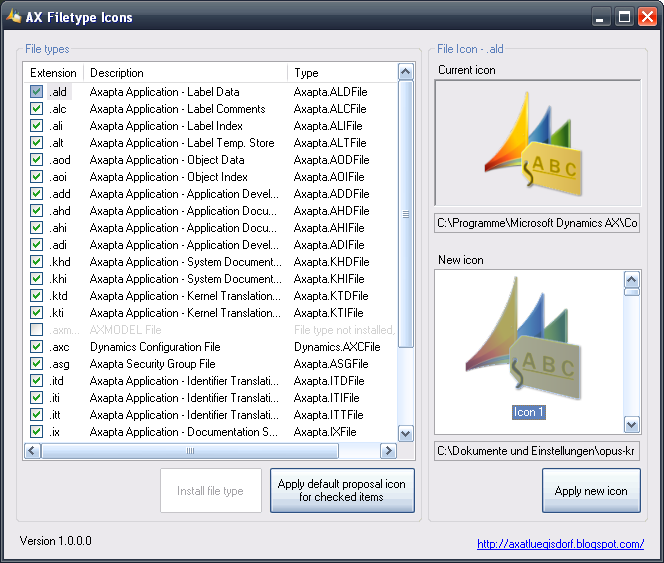
I've created some symbols which can be used as file icons for Dynamics AX. Additionally I've created a small application to let assign the files with the icons.


The application can be downloaded here:
http://www.luegisdorf.ch/AX/AXIcons.exe

On Vista/7 you have to run the application with administrator rights, otherwise the application will not work properly. And the executable file should be permanent placed in a local path, where it doesn't move again, because the icons are embedded in the EXE file (a good place could be C:\Programm files\Microsoft Dynamics AX\Common).